A blank programmable SIM is a small and patient thing. It comes out of the box with a gold contact pad and nothing written behind it, and it will sit in a radio all day, saying nothing, until someone gives it a name and a secret. Before it can carry a customer onto a private LTE network, every card needs four values: an IMSI, an ICCID, a Ki and an OPc. Two of those are secret keys, and the core has to hold the very same keys, down to the last hex digit, or the card will never get past hello.
Operators keep running into this as they bring SIMs in-house. The SIM writer arrives, the blank cards arrive, and then comes the quiet question of what to put on them. Too often the answer lives in a spreadsheet or a script somebody wrote once, and a mistake made there does not announce itself. A card with one wrong character looks perfectly healthy in the hand, and it shows its fault only later, at the bench or on the ladder, as an authentication failure in the core’s log.
So we built a free SIM card generator at The Edge Mile, and it went live today. It makes all four values for up to 10,000 SIMs in about a second, hands you a file for your SIM writer and a script that loads the same batch into your core, and does every bit of that work inside your own browser, which is where the keys stay.
Free, with no account and no email. Your keys never touch a server.
Four Numbers on a Blank Card
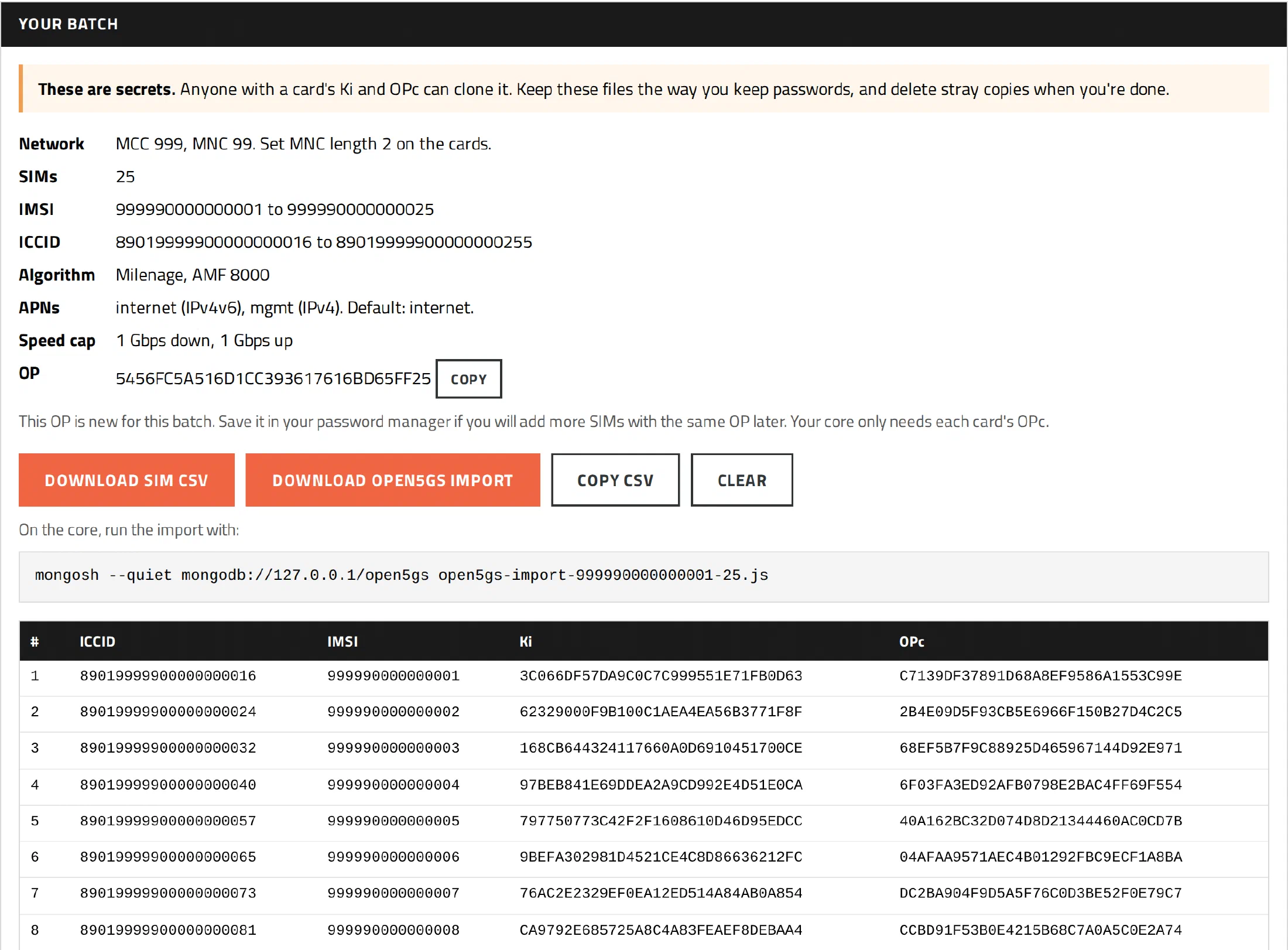
The IMSI is the card’s name on your network. It runs fifteen digits: your PLMN, which is a country code (the MCC) and a network code (the MNC), followed by a subscriber number (the MSIN). The generator counts those subscriber numbers up from wherever you tell it to begin.
The ICCID is the serial number printed on the plastic. The generator builds it from a prefix, 8901 unless you choose another, then the IMSI itself, then a Luhn check digit, so you can read a card’s IMSI straight off its ICCID.
The Ki is the 128-bit secret the card shares with your core, and every card gets its own. The generator draws it from your browser’s cryptographic random number generator, crypto.getRandomValues.
The OPc is where most of the confusion lives. A network keeps one operator key, the OP, and each card carries that OP mixed with its own Ki: OPc = AES-128(Ki, OP) XOR OP, as 3GPP TS 35.206 sets it down for Milenage. The generator makes a fresh OP for each batch, or takes the one you already use, and works out the OPc for every card, which keeps the OP itself off the SIM.
Those last two are the pair that must agree. If the Ki or OPc on a card differs from what the core holds by a single character, Open5GS turns the card away with a MAC failure, and the card will never tell you why.
What It Hands You
Pick a PLMN and the rest follows from it. The default is 999-99, because ITU-T E.212 sets MCC 999 aside for private networks, where it can never clash with a carrier. A CBRS network in the United States can choose 315-010 and enter its four-digit IMSI Block Number, which becomes the first four digits of every subscriber number and leaves room for 100,000 IMSIs in the block. Presets cover 001-01 for the test bench, 901-70 for a Rapid5GS core that kept its install default, and 999-70 to match the Open5GS sample configuration.
Each SIM can carry up to four APNs, as many as Open5GS allows a single subscriber, and each gets its own IP type: IPv4, IPv6 or IPv4v6. The first is the default, the one the core uses when a device does not ask for any APN in particular. A per-SIM speed cap rides along with them as the subscriber’s AMBR.
Then come the two files that matter. The first is a CSV for the SIM writer, one row per card with its ICCID, IMSI, Ki and OPc. The second is an import script that loads the whole batch into Open5GS or Rapid5GS with a single mongosh command, and it fills a real gap. Open5GS has no built-in CSV importer, and Rapid5GS does not install open5gs-dbctl, so the usual choices were clicking subscribers into the WebUI one at a time or writing an importer of your own. The script writes each subscriber the way the Open5GS WebUI does, skips any IMSI already in the database, and never edits a subscriber that is already there, so running it twice does no harm.
Keys That Never Leave the Room
Ordinarily you should never paste a Ki into a website, and a careful operator flinches at the thought. So the generator was built to be checked rather than trusted.
It runs inside a sandboxed frame with an opaque origin of its own, under a Content-Security-Policy of connect-src 'none'. Your browser refuses any network request the generator might try to make, and nothing else on the page, analytics included, can reach in and read what it holds. The keys are made in your browser, they stay in your browser, and they never touch a server.
It checks its own arithmetic, too. Every time it loads, it tests its math against the published test sets in 3GPP TS 35.208, and if a check fails, it will not generate at all. A tool that makes secret keys ought to prove it can still do its sums before it is allowed to do anything else.
And if you would rather trust no website, you need not. The whole generator downloads as one HTML file, its SHA-256 is published on the page so you can confirm your copy is the real one, and it runs just as happily on a machine with no network at all. Wherever it runs, treat what it gives you like passwords, because anyone holding a card’s Ki and OPc can clone that card.
The Rest of the Lesson
The page around the generator teaches what no generator can do for you. It walks through how to program SIM cards for a private LTE network: set the writer to Milenage, write the OPc rather than the OP, set the MNC length in the card’s EF_AD, add your PLMN to the card’s PLMN lists, and, wisest of all, test one card before you write the rest. It even warns you away from the most ordinary disaster of all. Open the CSV in Excel and save it again, and Excel turns a 20-digit ICCID into 8.90E+19, and the real digits are gone.
It explains which PLMN a private network should use, and for the morning a new card refuses to come up, it lists why a new SIM won’t attach, with the actual lines Open5GS prints in its log and what each one means.
Why It Is Free
The Edge Mile sells Nokia AZQC CBRS kits and Rapid5GS Pro, and we run wireless networks ourselves. The generator costs nothing and asks for no account and no email, and that is on purpose. It is a tool we wanted for our own networks, and the people now programming their own SIMs are the same people building the independent networks we care most about. A good tool in their hands makes the whole field of small operators a little stronger.
If you are building on Open5GS, the Rapid5GS hub and the source on GitHub are the place to start, and when the network needs more than SIMs, The Edge Mile can help you get it on the air.
Every SIM that ends up in a radio under the eaves of somebody’s house began as a blank card waiting for its numbers. They may as well be the right ones, made by a tool that keeps the keys where they belong.
Join the conversation
Every comment goes through manual review before it appears here. It is a small stand against the dead internet, a way to be sure these are real people in a real conversation. Your email is never published.
Replying to .
Thank you.
Your comment is in the queue. I read every one and post the good-faith ones by hand, so look for it on the page before long.