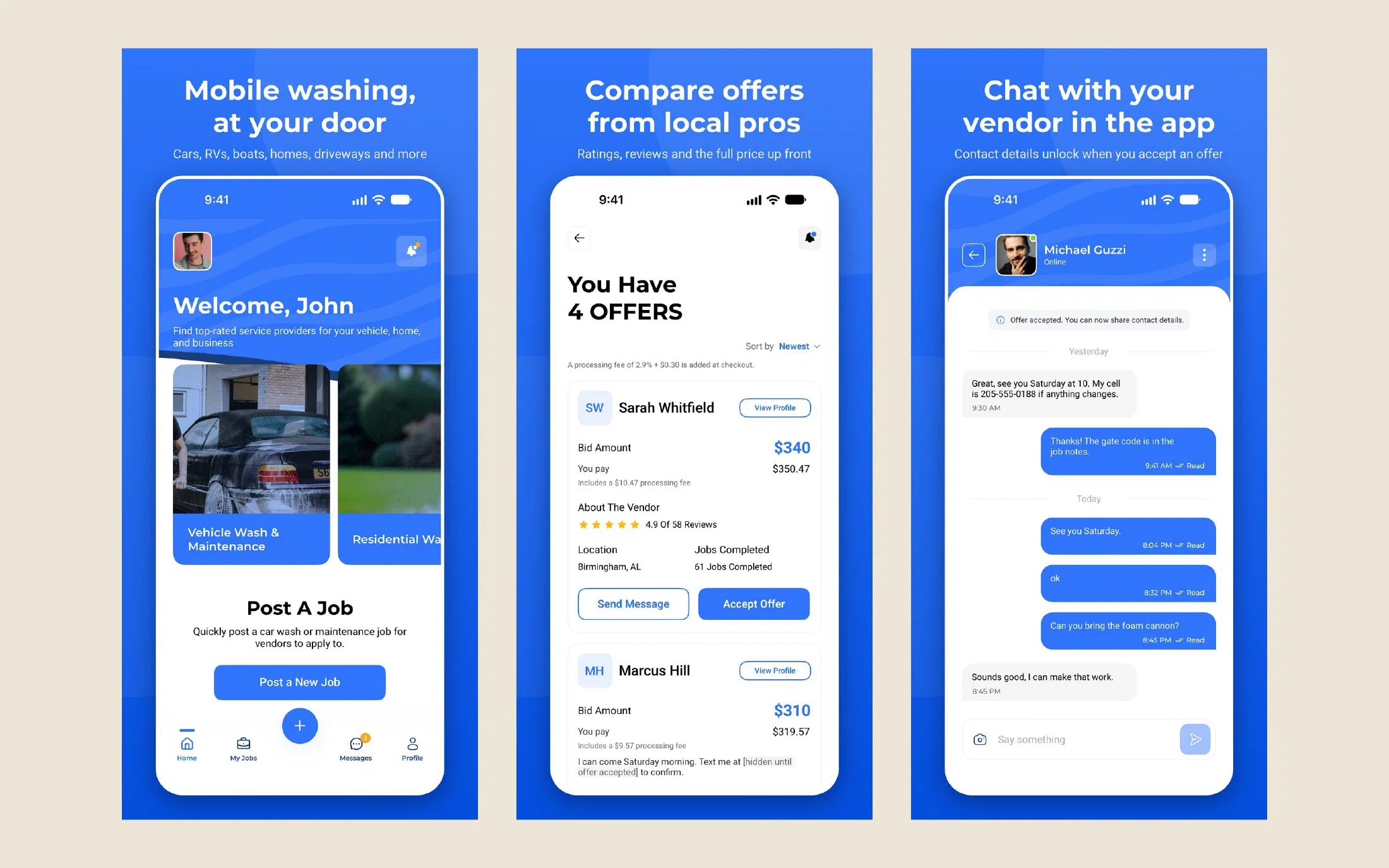
John owns Mobile Wash USA, a Montgomery company with one app for getting things washed. A customer posts a job, anything from a car to a roof to a parking lot, and local vendors bid on it. The customer picks an offer, chats with the vendor and pays in the app.
That was the plan, anyway. John found us in July by googling for somebody to rescue a mobile app, because the vendor he’d hired to build his had missed its delivery date. We talked by phone and planned a sit-down in Montgomery, and then my fourth child was born and the meeting had to wait. Life happened, as it does, and we got it back on the calendar in October. We met John and his wife in Montgomery on Tuesday the 27th. She had kept notes on everything wrong with the app, and we went through them one at a time on a phone.
What the old app did
By then the app was in Google Play, so we could test the real thing.
- I typed an address in Centreville, and the map dropped the pin in Los Angeles.
- Nearby Vendors ignored the phone’s GPS.
- No notification arrived for a new bid, an accepted job or a message, and the app icon never showed a badge.
- Chat messages only showed up after you left the job and opened it again.
- A customer could skip the payment step and still finish the job.
- Photo upload said “coming soon.” So did Security Settings. The saved location said “not saved yet.”
- Under Help, “Chat with us” and “Call us” were both broken.
John had a full set of Figma designs, and the app in the store looked like the wireframes that come before them. Splitting each payment between the vendor and the company was done by hand. The app itself was written in Flutter, and it talked to an API on a cloud server the vendor held.
The plan
It was obvious from the Figma file that John and his designer had thought this business through. The designs were solid, and so were the rules behind them: who can bid on a job, when contact details unlock, when the money moves. The failure was purely in the technical execution, and that part we could fix. So we kept the designs and the rules and replaced everything underneath them.
My company, Centreville Tech, would rebuild the phone apps and the backend, and move all of it into hosting in John’s own name. We quoted a fixed price and a two-week sprint. That schedule depended on AI coding agents doing most of the typing while I directed and reviewed the work, and John knew that going in.
The apps went to Titanium, an open source SDK that builds native iPhone and Android apps from one JavaScript codebase. Titanium is maintained by TiDev, a 501(c)(3) based here in Alabama, and I’m its chairman. We’ve shipped Titanium apps for years, Haven Today, Lightwave LINK and Streamline Scout among them, so we came to this job with a deep bench. When something breaks, I usually know which file to open.
Titanium also suits the way we build now. AI-accelerated development is an area where it dominates. Alloy, Titanium’s app framework, gives every screen the same shape: a view, a controller and its styles, each in a set place. An AI agent working inside that structure stays between the lines, and its work is quick to review because it looks like every other screen in the app. It also writes each screen once, in JavaScript, where a native project needs it written twice, in Swift and again in Kotlin.
None of that costs the user anything. A Titanium screen is made of the platform’s own native views, the same ones a Swift or Kotlin app puts on the screen, so it performs the way a native app does. Anything the framework didn’t have, we extended, which is where the three modules further down came from. Choosing Titanium over two native apps meant zero compromises in the product, and it let us ship in a fraction of the time.
One week of building
The first commit landed on Monday, November 9.
Within a day, every one of the 80-some screens in the Figma file existed as a click-through prototype running on sample data. The backend got its foundation the same day: the API, the database and an admin dashboard with two-step login. On Wednesday the app came off sample data and onto the real API, one feature area at a time, and we made the first iPhone build. Thursday brought real push notifications, sign-in with Google, Facebook and Apple, and card payments through Stripe. Friday and Saturday went to signed builds on an actual iPhone, the four faults that only showed up there, and an accessibility pass.
Android builds ran on a headless Android 15 container on a Linux server. iPhone builds ran on a rented Mac at first and on my own MacBook once it was time to sign them. Between the app and the backend, a little over a thousand commits went in during those eight days.
Version 2.0 reached Google Play on November 16 and the App Store on November 17, three weeks to the day after that meeting in Montgomery. It shipped as an update to the listings John already had, so anyone who had installed the old app got the new one the usual way.
What works now
Everything on the list from October 27 got fixed.
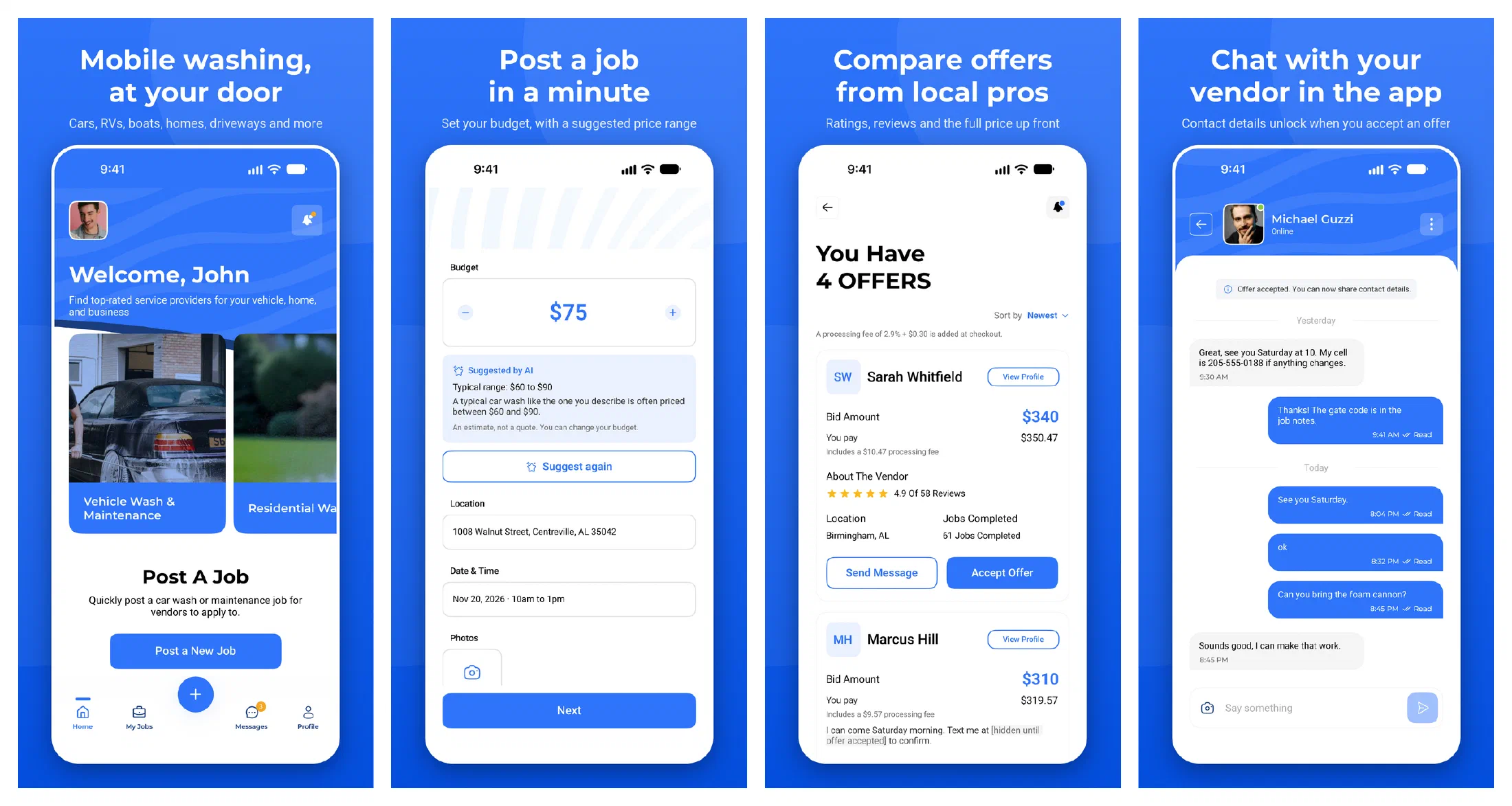
An address typed in Centreville puts the pin in Centreville, and vendors see open jobs sorted by distance from where their phone really is. Bids, accepted offers, messages and status changes all arrive as push notifications, with a count on the app icon. Chat is live, with typing indicators and read receipts.
Customers and vendors can talk before a job is booked, but phone numbers, email addresses and links are hidden in the chat until the customer accepts an offer. That was John’s rule, so a job that starts in the app gets booked in the app.
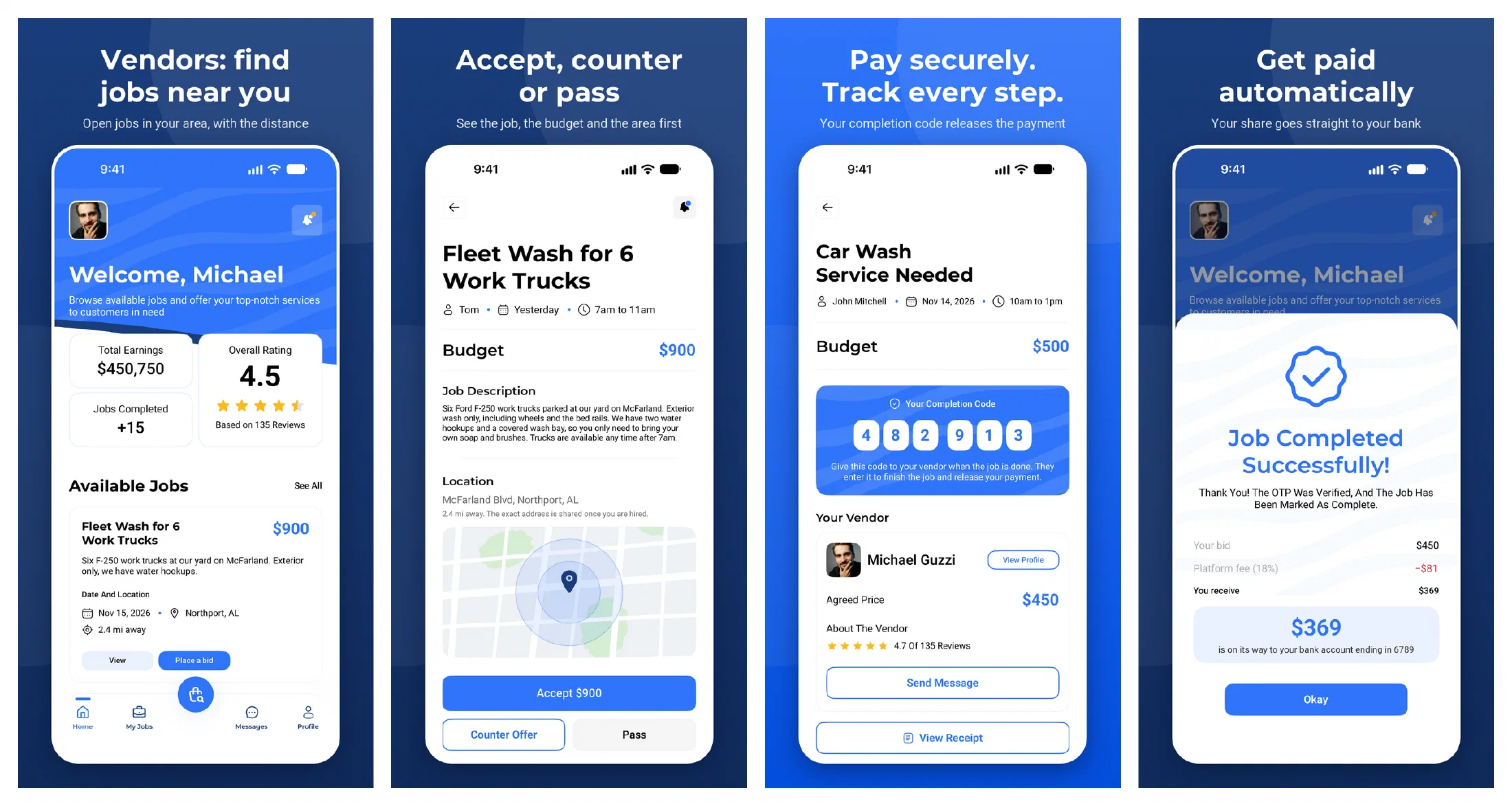
Payment can’t be skipped anymore. The customer pays by card when accepting an offer, and the money is held until the job is done. When the work is finished, the customer gives the vendor a six-digit code, the vendor types it in, and Stripe Connect sends the vendor’s share to their bank and the platform fee to Mobile Wash USA. That split used to be done by hand.
The account screens work: photo upload, saved location, password changes and two-step sign-in. “Chat with us” lands in a support inbox on the dashboard, where John’s team answers it. “Call us” is gone, which is what John asked for. Account deletion is in the app, because both stores require it.
A few things weren’t on the list. A customer who has no idea what a roof wash costs can ask for a suggested price range before posting. The app reads properly with a screen reader, follows the phone’s text size setting and respects reduced motion.
The backend, in John’s own account
The new backend is Laravel, hosted in Linode’s Atlanta data center. It serves the API for the phone apps and a dashboard where John’s team reviews vendor documents, answers support chats and follows every payment. Automated tests run on every change before anything is deployed.
The old backend lived in a cloud account the vendor held. The new one is in John’s account. It has good offsite backups, and we restored one to prove they work.
Three new Titanium modules
Titanium didn’t have everything this app needed. Where a piece was missing, we wrote it and released it as open source, so the next Titanium team doesn’t have to.
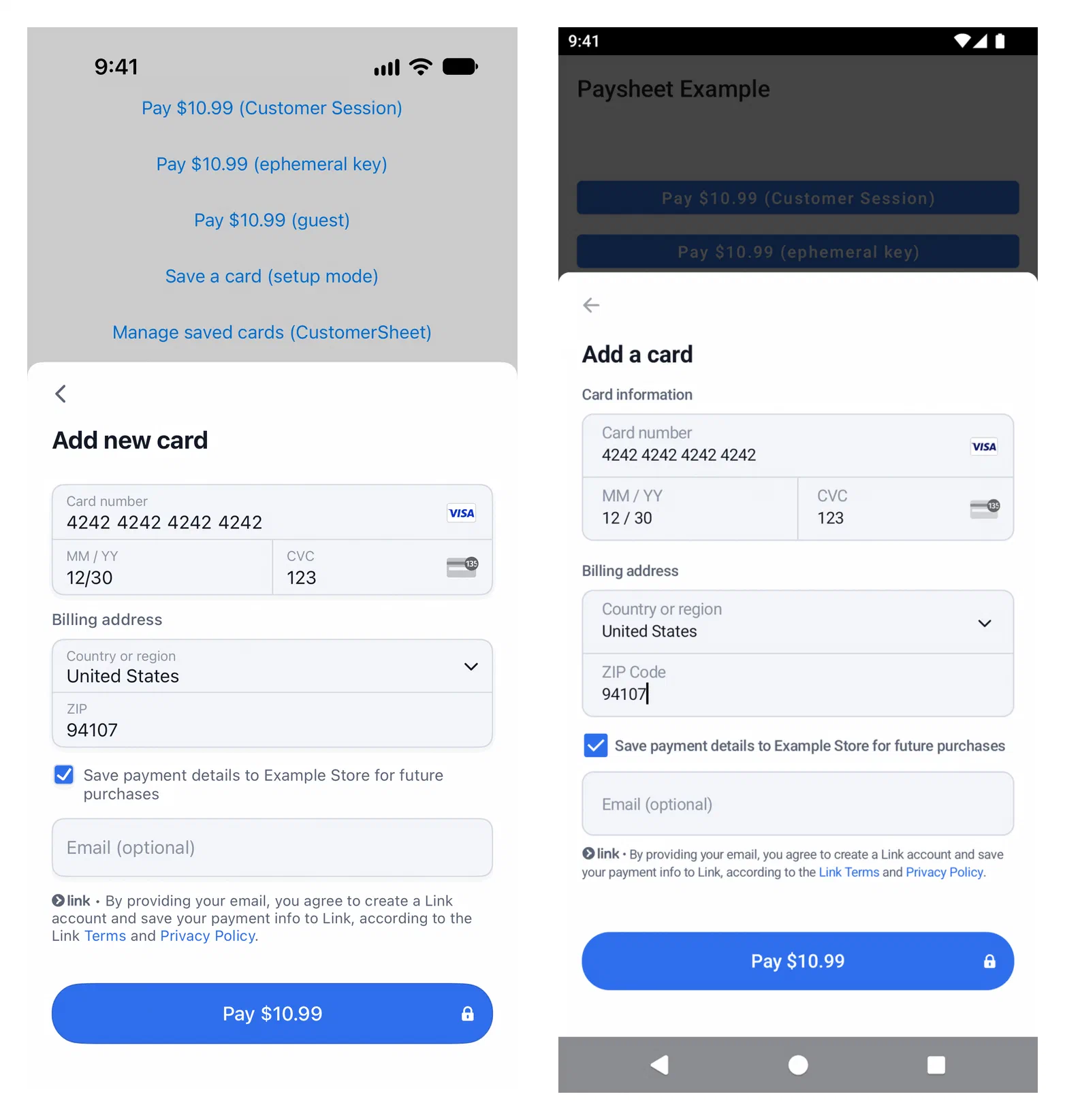
- Ti.Paysheet puts Stripe’s PaymentSheet and CustomerSheet in a Titanium app on iPhone and Android, built on Stripe’s current SDKs. The wrappers that existed were stuck on SDK versions from 2023.
- Ti.Socketline is a native WebSocket client. Titanium has no WebSocket API of its own, and the pure JavaScript options can’t make an encrypted connection on an iPhone. The live chat in Mobile Wash USA runs on it.
- Ti.ModernRESTe is RESTe 2, a modernized fork of Jason Kneen’s RESTe, the library a lot of Titanium apps have used to talk to their APIs for more than ten years. It adds promises, retries, caching, pagination and uploads, and an old 1.x config still works.
We also fixed the modules that were already there. Sixteen pull requests went upstream during the project: to Alloy and the Titanium SDK themselves, and to the community modules for Sign in with Apple, Google Sign-In, the in-app browser, remote images and Firebase push. Four have been merged so far, and the rest are waiting on review. These join Ti.Scrollwatch and Ti.ModernOneSignal, which we released in August.
The website
With the apps in the stores, we turned to mobilewashusa.com. The old site was a Next.js app on Vercel. We rebuilt it as a static Hugo site and moved it to Linode with everything else.
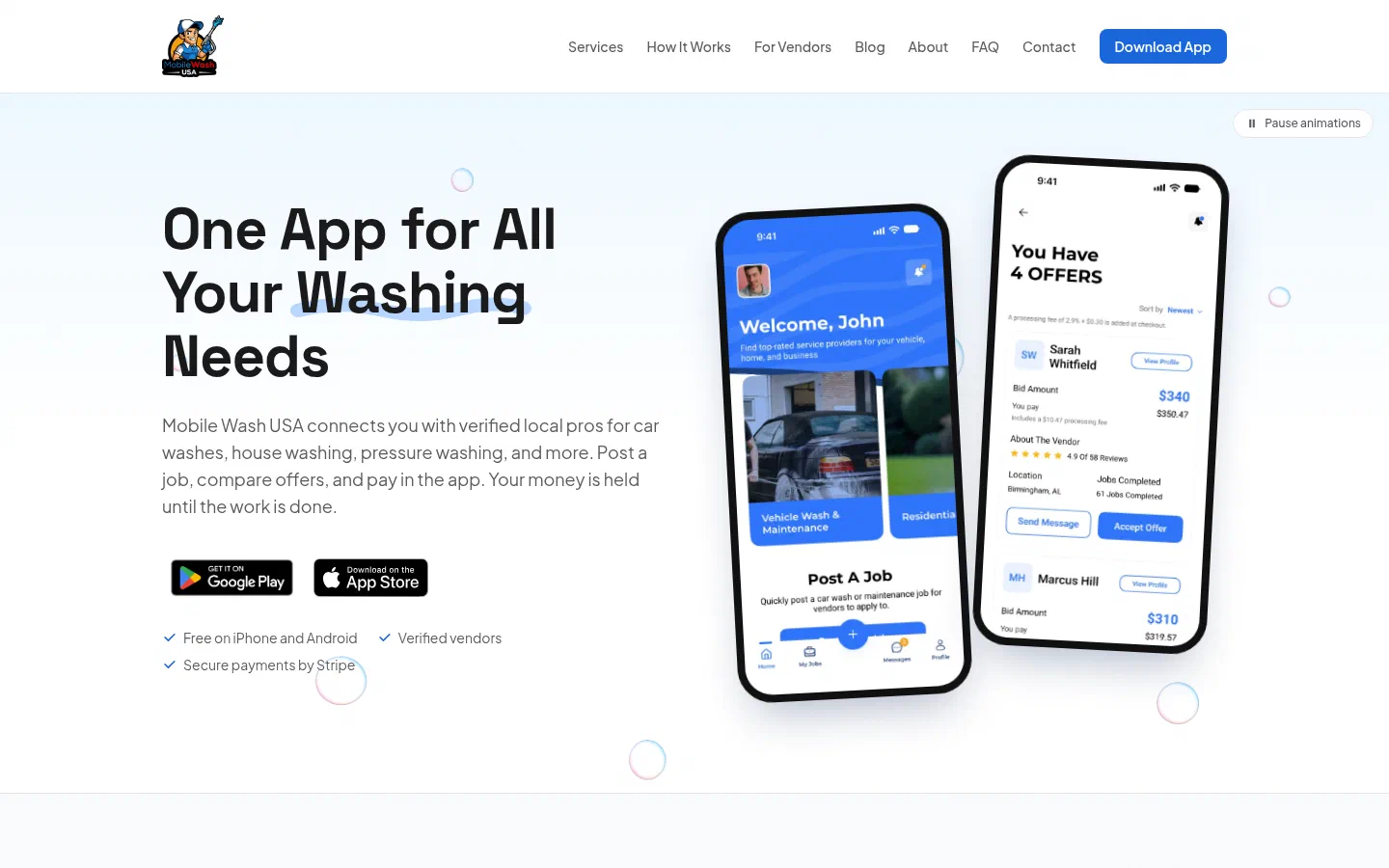
The copy was rewritten in plain language, with new How It Works and For Vendors pages and a Services page that covers all eleven kinds of job. Every page has a real title and description. Structured data tells Google what the company is, where it is, what the app does and which questions the FAQ answers. There’s an llms.txt file for the AI assistants, which is the same groundwork I laid for Felda Baptist Church and Vertical Axis.
For accessibility, we worked the site against WCAG 2.2 at Level AA, the standard that ADA website cases usually point to. It has a skip link, text that passes contrast checks, a button that pauses the animations, and a published accessibility statement. The privacy policy, terms and vendor agreement were updated to match how the new app works, and the analytics stay off for any visitor whose browser sends Do Not Track or Global Privacy Control.
Go wash something
Mobile Wash USA is free on the App Store and Google Play, and it’s launching in Alabama first. If you wash cars, houses, boats or parking lots for a living, the vendor page explains how to sign up and start bidding.
Do you have an app that’s stuck with a vendor who can’t finish it? Send me an email and tell me where it stands.