When we met John and his wife in Montgomery to go through what was wrong with the Mobile Wash USA app, one item on her list was about money. A customer could skip the payment step and still finish the job. Mobile Wash USA is a marketplace, where a customer posts a wash job, local vendors bid on it, and the app takes the payment and keeps a fee. With a payment step that could be skipped, a job could be finished without anybody getting paid through the app.
We rebuilt the app in Titanium, and the new rule was simple. The customer pays by card when accepting an offer, and the money is held until the job is done. To take that card we wanted Stripe’s own payment screen, built on Stripe’s current software. So my company, Centreville Tech, wrote a module for it and released it as Ti.Paysheet, free and open source.
Why Stripe’s screen
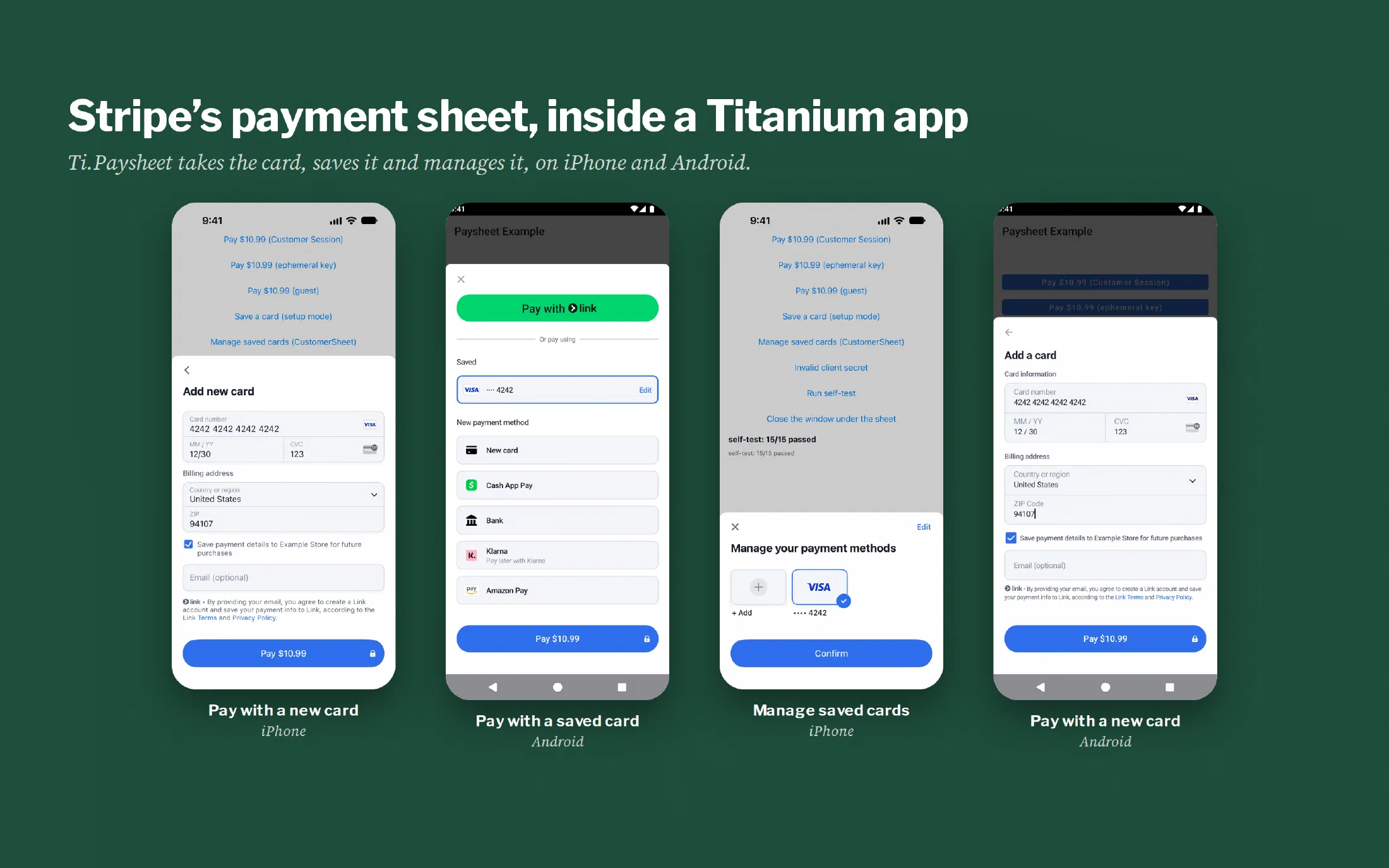
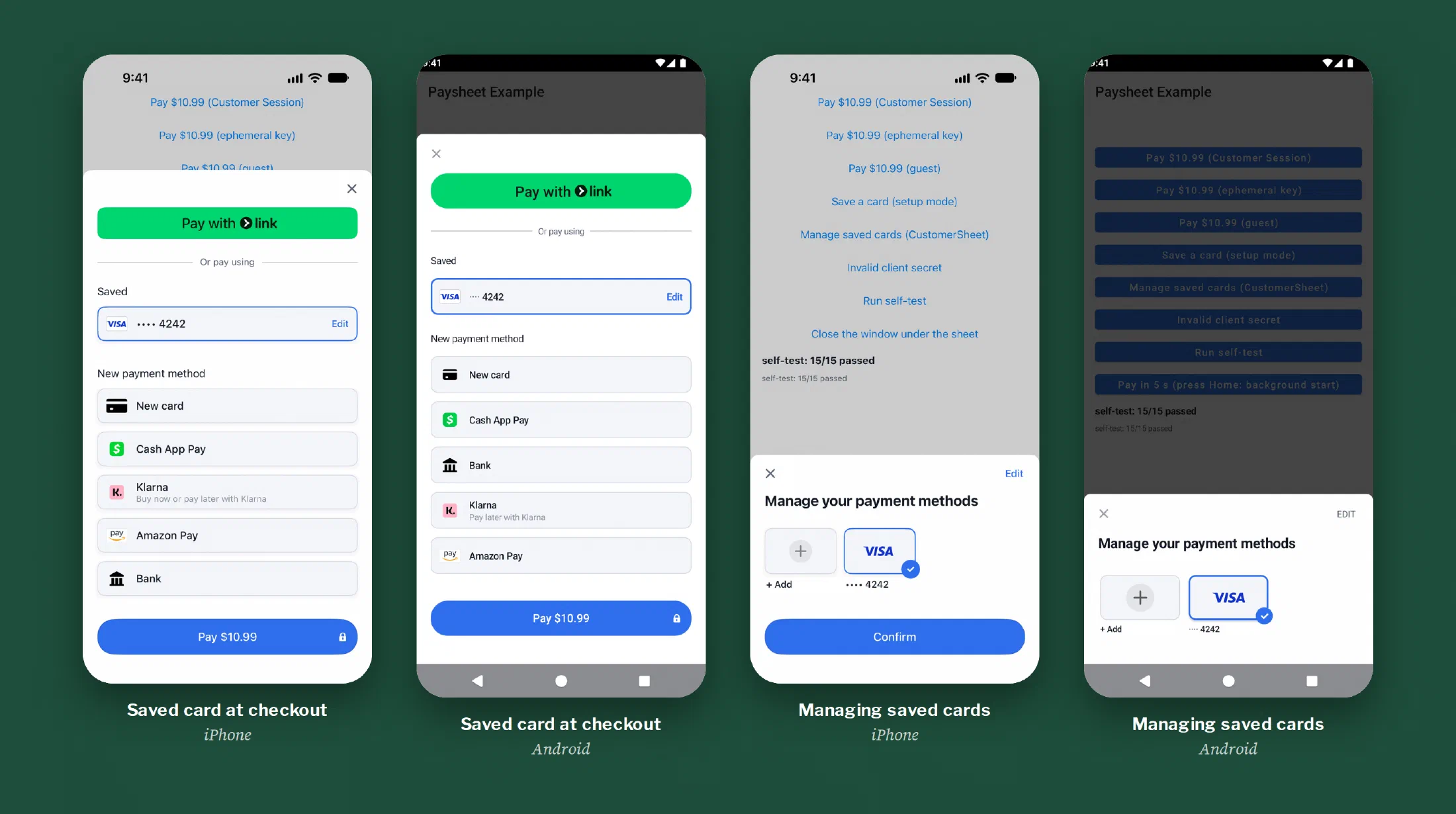
Stripe makes a prebuilt payment screen called PaymentSheet. It slides up from the bottom of the phone and takes the card, and it handles the parts of a payment that are easy to get wrong. The card number goes from the sheet to Stripe and never passes through the app’s code or John’s server. When a bank wants the extra verification step called 3-D Secure, the sheet runs it. A returning customer sees the card they saved last time.
Stripe keeps all of that current as the card rules change. I didn’t want to build any of it by hand for a marketplace that had two weeks to get into the stores.
Hans got there first
A Titanium app reaches a native feature like this through a module, a small piece of native code with a JavaScript face on it. Stripe has had one in Titanium since 2020, when Hans Knöchel published titanium-stripe. For six years it has been there for any Titanium app that needed to take a card through Stripe, and Hans was still shipping Android releases of it this year.
Hans is TiDev’s lead iOS engineer, and it’s hard to build a Titanium app without leaning on him. Mobile Wash USA runs on three more of his modules, for push notifications, Firebase and Google Sign-In. Ti.Paysheet follows the trail he cut: his module showed that Stripe’s native payment screen belongs in a Titanium app and how to put it there.
What Mobile Wash USA needed went past titanium-stripe in a few places. We wanted Stripe’s Customer Sessions, the newer way for an app to reach a customer’s saved cards. An iPhone customer sent out to their bank’s 3-D Secure page had to land back in the app. And both platforms had to sit on Stripe’s current release. Those changes reach all the way down, so we wrote a new module around them.
What Ti.Paysheet does
Ti.Paysheet wraps Stripe’s current iPhone and Android software and gives a Titanium app the same few JavaScript calls on both.
- PaymentSheet takes a payment, or saves a card for later without charging it.
- CustomerSheet is where a customer manages saved cards: add one, remove one, choose which to use.
- Apple Pay and Google Pay are in the module as options to switch on.
Most of the work went into what happens when a payment doesn’t go in a straight line. Each time the sheet closes, the app gets exactly one answer: completed, canceled or failed. On Android that answer survives the phone being rotated. It also survives Android shutting the app down in the middle of a bank verification, and the result is waiting when the app comes back.
A “completed” from the sheet still isn’t treated as proof of payment. In Mobile Wash USA the app waits for John’s server, which hears from Stripe directly, before a job counts as booked.
How it was tested
Before the release I ran it on an iPhone simulator and an Android device image with Stripe’s test cards. There’s a card that works and a card that gets declined. There are cards that force 3-D Secure, both the kind that verifies inside the app and the kind that sends the customer out to a web page and back. Saved cards and CustomerSheet were run on both platforms. Since then the module has taken payments on real phones in a live app.
I haven’t tested Apple Pay or Google Pay. The settings are in the module, but Mobile Wash USA launched without wallets, and proving them takes merchant setup we didn’t need for launch. The README says so in its verification table, next to everything that was run.
Where to get it
Version 1.0.0 is on GitHub under the Apache 2.0 license, and it needs Titanium SDK 13.4 or later. It’s one of three modules that came out of the Mobile Wash USA rebuild. The other two are Ti.Socketline, which runs the live chat, and RESTe 2, which talks to the API.
Does your Titanium app need to take payments, or is its payment screen stuck on something old? Send me an email and tell me what it’s doing.